

I often have several terminal tabs running Claude Code and Codex. Default terminal titles do not make it obvious which agent owns a tab, which repository it is changing, or whether it is working, waiting for permission, or finished.
Claude Code and Codex expose lifecycle hooks, while Pi exposes an extension API. Each can drive a small title writer which uses Kitty remote control to update the current tab. A shell prompt hook restores the normal directory title after the agent exits.
The result
Portable baseline
Extended setup in daily use
The later refinements replace the plain markers with Nerd Font repository glyphs, shorter names and richer task or state information.
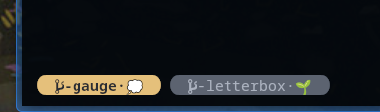
A compact title can contain:
- the agent:
Cfor Claude Code,Xfor Codex orπfor Pi; - the Git repository, or current directory outside Git;
- a shortened branch or task identifier; and
- a state marker showing what the agent is doing.
| State | Marker |
|---|---|
| Session started | 🌱 |
| Thinking or waiting for input | 💭 |
| Using a tool | ⚙ |
| Permission or answer required | ❓ |
| Turn finished | ✔ |
| Compacting context | 🧹 |
The exact labels and symbols are personal preference. The useful part is that the title changes with the agent lifecycle.
How it works
- Kitty listens on a local Unix socket for remote-control commands.
- Claude Code or Codex emits a lifecycle hook event.
- The hook passes JSON on standard input to a Bash script.
- The script derives a short repository and branch label.
kitten @ set-tab-titleupdates the Kitty tab.- The next Fish prompt restores the ordinary working-directory title.
Requirements
- Kitty terminal;
- Bash, Git and jq;
- Claude Code, Codex, Pi, or any combination; and
- optionally Fish for the shell-title reset shown below.
The example uses plain letters and standard Unicode symbols. My own titles also use Nerd Font Git and folder glyphs, but those should only be added when the configured terminal font supports them.
Configure Kitty remote control
Add a local socket to ~/.config/kitty/kitty.conf:
allow_remote_control socket-only
listen_on unix:@kitty
Restart Kitty after changing listen_on. Test the
connection from a Kitty shell:
kitten @ set-tab-title "title test"If that does not find the socket, specify it explicitly:
kitten @ --to unix:@kitty set-tab-title "title test"Create a shared title script
Save this portable baseline as
~/.local/bin/kitty-agent-title:
~/.local/bin keeps the basic setup
shared and avoids duplicating fixes. It also works naturally when
that directory is already on PATH.
Agent-owned locations are equally valid:
~/.claude/kitty-title.sh and
~/.codex/kitty-title.sh. Separate files become useful
when Claude Code and Codex need different events or title logic.
#!/usr/bin/env bash

AGENT=${1:-agent}
PAYLOAD=$(cat)

json_value() {
  local key="$1"
  printf '%s' "$PAYLOAD" | jq -r --arg key "$key" \
    '.[$key] // empty' 2>/dev/null
}

EVENT=$(json_value hook_event_name)
CWD=$(json_value cwd)
[ -z "$CWD" ] && CWD="$PWD"

GIT_ROOT=$(git -C "$CWD" rev-parse --show-toplevel 2>/dev/null || true)
BRANCH=$(git -C "$CWD" branch --show-current 2>/dev/null || true)

if [ -n "$GIT_ROOT" ]; then
  REPO=$(basename "$GIT_ROOT")
else
  REPO=$(basename "$CWD")
fi

case "$BRANCH" in
  main|master|trunk|"") BRANCH="" ;;
  feature/*|fix/*|bugfix/*|chore/*) BRANCH=${BRANCH#*/} ;;
esac

case "$AGENT" in
  claude) LABEL="C $REPO" ;;
  codex)  LABEL="X $REPO" ;;
  *)      LABEL="$AGENT $REPO" ;;
esac

[ -n "$BRANCH" ] && LABEL="$LABEL/$BRANCH"

case "$EVENT" in
  SessionStart)                  MARK="🌱" ;;
  UserPromptSubmit|PostToolUse)  MARK="💭" ;;
  PreToolUse)                    MARK="⚙" ;;
  PermissionRequest)             MARK="❓" ;;
  Stop|SubagentStop)             MARK="✔" ;;
  PreCompact|PostCompact)        MARK="🧹" ;;
  *)                             MARK="" ;;
esac

TITLE="$LABEL"
[ -n "$MARK" ] && TITLE="$TITLE $MARK"

if command -v kitten >/dev/null 2>&1; then
  kitten @ set-tab-title "$TITLE" >/dev/null 2>&1 \
    || kitten @ --to unix:@kitty set-tab-title "$TITLE" >/dev/null 2>&1 \
    || true
fi

# Fallback to terminal title escape sequences.
(
  exec 2>/dev/null
  printf '\e]30;%s\a' "$TITLE" > /dev/tty || true
  printf '\e]2;%s\a' "$TITLE" > /dev/tty || true
) || true
Make it executable:
chmod +x ~/.local/bin/kitty-agent-titleIf using separate agent scripts, make both executable and update the hook commands in the following sections:
chmod +x ~/.claude/kitty-title.sh ~/.codex/kitty-title.sh| Layout | Hook command |
|---|---|
| Shared script for Claude Code | ~/.local/bin/kitty-agent-title claude |
| Shared script for Codex | ~/.local/bin/kitty-agent-title codex |
| Claude-specific script | ~/.claude/kitty-title.sh |
| Codex-specific script | ~/.codex/kitty-title.sh |
The script deliberately ignores errors. A title failure must never interrupt an agent session.
Connect Claude Code hooks
Merge hooks like these into
~/.claude/settings.json. If that file already has a
hooks object, add the event entries rather than
replacing the whole file.
{
  "hooks": {
    "SessionStart": [
      {
        "hooks": [
          {
            "type": "command",
            "command": "~/.local/bin/kitty-agent-title claude"
          }
        ]
      }
    ],
    "UserPromptSubmit": [
      {
        "hooks": [
          {
            "type": "command",
            "command": "~/.local/bin/kitty-agent-title claude"
          }
        ]
      }
    ],
    "PreToolUse": [
      {
        "matcher": "*",
        "hooks": [
          {
            "type": "command",
            "command": "~/.local/bin/kitty-agent-title claude"
          }
        ]
      }
    ],
    "PermissionRequest": [
      {
        "hooks": [
          {
            "type": "command",
            "command": "~/.local/bin/kitty-agent-title claude"
          }
        ]
      }
    ],
    "Stop": [
      {
        "hooks": [
          {
            "type": "command",
            "command": "~/.local/bin/kitty-agent-title claude"
          }
        ]
      }
    ]
  }
}
Add PostToolUse and PreCompact in the
same form if you want the finer state transitions shown earlier.
Connect Codex hooks
Codex reads user hooks from ~/.codex/hooks.json.
Like Claude Code, it includes hook_event_name in the
JSON payload, so each hook can call the same command:
{
  "hooks": {
    "SessionStart": [
      {
        "matcher": "*",
        "hooks": [
          {
            "type": "command",
            "command": "~/.local/bin/kitty-agent-title codex",
            "timeout": 5
          }
        ]
      }
    ],
    "UserPromptSubmit": [
      {
        "hooks": [
          {
            "type": "command",
            "command": "~/.local/bin/kitty-agent-title codex",
            "timeout": 5
          }
        ]
      }
    ],
    "PreToolUse": [
      {
        "matcher": "*",
        "hooks": [
          {
            "type": "command",
            "command": "~/.local/bin/kitty-agent-title codex",
            "timeout": 5
          }
        ]
      }
    ],
    "PermissionRequest": [
      {
        "matcher": "*",
        "hooks": [
          {
            "type": "command",
            "command": "~/.local/bin/kitty-agent-title codex",
            "timeout": 5
          }
        ]
      }
    ],
    "Stop": [
      {
        "hooks": [
          {
            "type": "command",
            "command": "~/.local/bin/kitty-agent-title codex",
            "timeout": 5
          }
        ]
      }
    ]
  }
}
Codex asks you to review new or changed command hooks. Use
/hooks in the CLI to inspect and trust the definition.
Matching hooks from different configuration layers are combined,
so check for duplicates if the title updates more than expected.
Restore the shell title
Without a reset, the completed agent title remains after returning to the shell. Fish can restore a directory-based title whenever it displays a prompt.
Create
~/.config/fish/functions/update_kitty_tab_title.fish:
function update_kitty_tab_title \
    --description 'Reset Kitty tab title to the shell location' \
    --on-event fish_prompt

    status is-interactive; or return
    set -q KITTY_WINDOW_ID; or return

    set -l title (prompt_pwd)
    test -n "$title"; or set title (pwd)

    if type -q kitten
        kitten @ set-tab-title "" >/dev/null 2>&1
        or kitten @ --to unix:@kitty set-tab-title "" >/dev/null 2>&1
    end

    printf '\e]30;%s\a' "$title" >/dev/tty 2>/dev/null
    printf '\e]2;%s\a' "$title" >/dev/tty 2>/dev/null
end
Load it from ~/.config/fish/config.fish:
source ~/.config/fish/functions/update_kitty_tab_title.fishBash and Zsh can do the same from their prompt hooks. The important detail is that the shell should only reset the title when a prompt is shown, not while the foreground agent is running.
set-tab-title with an empty title returns the
tab to following the active terminal window title. Setting the
directory itself as an explicit tab title looks identical locally,
but prevents title escape sequences arriving over SSH from taking
effect.
Further refinements
The separate Claude and Codex scripts this article grew from go further than the portable example. Each refinement below is independent, so add only the parts which match your workflow.
Nerd Fonts and emoji
The plain C and X agent markers work
everywhere. My own titles use a Git branch glyph inside a repository
and a folder glyph outside Git:
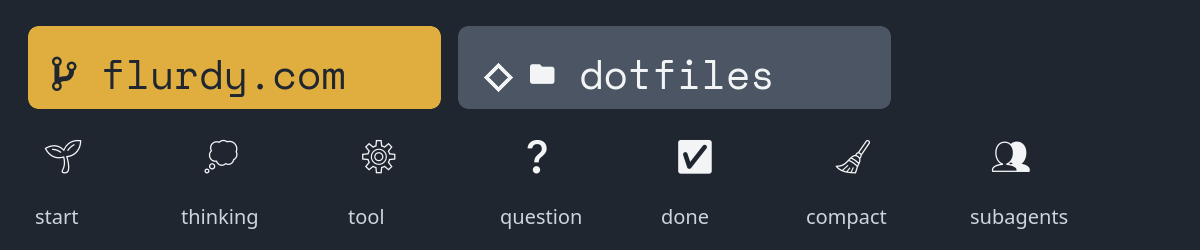
The first two are private-use characters supplied by
Nerd Fonts. You can use a
fully patched programming font, or let Kitty map only the symbol
code points to Symbols Nerd Font Mono. The bitmap above
is used because a web browser cannot rely on Kitty's font mapping
and may otherwise display empty boxes:
symbol_map U+E725 Symbols Nerd Font Mono
symbol_map U+F024B Symbols Nerd Font Mono
Nerd Font versions occasionally move glyphs between code points. Copy the actual symbols from a picker or your prompt configuration, and test them directly in Kitty before putting them in a hook.
I use ordinary Unicode emoji for the lifecycle states shown above.
Emoji appearance depends on the fallback font and operating system,
and some render wider than one terminal cell. If compact alignment
matters more than colour, replace them with ASCII such as
S, ..., *,
? and OK.
The richer repository label then starts like this:
GIT_MARK=$'\uE725'
FOLDER_MARK=$'\U000F024B'

if [ -n "$GIT_ROOT" ]; then
  MARK="$GIT_MARK"
else
  MARK="$FOLDER_MARK"
fi

case "$AGENT" in
  claude) LABEL="$MARK-$REPO" ;;
  codex)  LABEL="◈$MARK-$REPO" ;;
esac
Adjust the glyph baseline
Emoji and fallback glyphs may sit slightly low in the tab bar. Kitty can raise the font baseline globally:
font_size 12.0
modify_font baseline 1px
Reload Kitty after changing it. This affects text inside terminal windows as well as tab titles, so start with one pixel. Raising it further may centre the emoji while making ordinary text look too high. Tab-bar margins move the whole bar and do not correct the glyph baseline.
Use agent titles over SSH
A remote Claude Code or Codex process cannot connect to the Kitty Unix socket on the local machine. Ordinary terminal title escape sequences do cross an SSH pseudo-terminal, but Claude Code may immediately replace the window title with its own status.
Kitty remote-control commands can also travel inside the terminal
stream. Permit only tab-title changes in the local
kitty.conf:
allow_remote_control socket
remote_control_password "" set-tab-title
listen_on unix:@kitty
Reload Kitty, then create a new tab. Kitty applies a changed
remote-control policy only to newly created terminal windows.
The empty password is deliberately restricted to
set-tab-title; do not replace it with unrestricted
remote control.
Agent hooks may inherit SSH_TTY without having a
controlling /dev/tty. In that case
kitten @ fails even though the SSH terminal is known.
Send the narrowly permitted command directly to
$SSH_TTY:
set_kitty_tab_title() {
  if [ -n "$SSH_TTY" ]; then
    local command
    command=$(jq -cn --arg title "$TITLE" \
      '{cmd:"set-tab-title",
        version:[0,26,0],
        no_response:true,
        payload:{title:$title}}')
    printf '\eP@kitty-cmd%s\e\\' "$command" > "$SSH_TTY"
  elif command -v kitten >/dev/null 2>&1; then
    kitten @ set-tab-title "$TITLE" >/dev/null 2>&1 \
      || kitten @ --to unix:@kitty set-tab-title "$TITLE" \
           >/dev/null 2>&1
  fi
}

set_kitty_tab_title 2>/dev/null || true
The older protocol version is intentional: newer Kitty versions
accept commands from older compatible clients. The
no_response flag prevents the hook waiting for a
reply on a terminal it does not read.
A small marker distinguishes remote agents without displaying long cloud hostnames. An optional alias is useful when several remote machines are open:
if [ -n "$SSH_TTY" ]; then
  REMOTE_PREFIX="🌐"
  [ -n "$KITTY_TITLE_HOST_ALIAS" ] \
    && REMOTE_PREFIX="$REMOTE_PREFIX$KITTY_TITLE_HOST_ALIAS/"
  LABEL="$REMOTE_PREFIX·$LABEL"
fi
🌐·GIT-letterbox·DONE
🌐rv/·GIT-letterbox·DONE
In Kitty, GIT and DONE can be the Nerd
Font and emoji markers introduced above. Plain text is used here
because private-use Nerd Font glyphs are not reliable in browsers.
{title.split()[0]}, so an
ordinary space after the globe would leave only the globe visible.
The middle dot matches the separator already used before the
lifecycle state.
Use the repository name in Git worktrees
git rev-parse --show-toplevel returns the worktree
directory. If worktrees have names such as
worktree-fix-login, that is less useful than the
shared repository name.
Claude Code can create an isolated worktree with
claude -w. With no optional name, it generates a
memorable but long name such as mellow-soaring-summit.
You can supply a name with claude -w fix-login, but it
still describes the worktree rather than the repository.
| Source | Example tab repository label |
|---|---|
Worktree directory from bare claude -w |
mellow-soaring-summit |
Named worktree from claude -w fix-login |
fix-login |
| Shared Git common directory | flurdy.com-docs |
Git's common directory points back to the main repository. Resolve it as an absolute path and use its parent directory:
GIT_ROOT=$(git -C "$CWD" rev-parse --show-toplevel 2>/dev/null || true)
GIT_COMMON_DIR=$(git -C "$CWD" \
  rev-parse --path-format=absolute --git-common-dir 2>/dev/null || true)

if [ -n "$GIT_ROOT" ]; then
  if [ -n "$GIT_COMMON_DIR" ]; then
    REPO=$(basename "$(dirname "$GIT_COMMON_DIR")")
  else
    REPO=$(basename "$GIT_ROOT")
  fi
else
  REPO=$(basename "$CWD")
fi
Shorten branch names
Full branch names quickly consume a narrow tab. I remove conventional prefixes, preserve useful pull-request and ticket IDs, and otherwise keep only the first part:
short_branch() {
  local branch="$1"
  branch="${branch#worktree-}"
  branch="${branch#feature/}"
  branch="${branch#fix/}"
  branch="${branch#bugfix/}"
  branch="${branch#chore/}"

  case "$branch" in
    main|master|trunk|"") printf '' ;;
    pr-[0-9]*|PR-[0-9]*)
      printf '%s' "$branch" | sed -E 's/^([Pp][Rr]-[0-9]+).*/\1/'
      ;;
    [A-Za-z][A-Za-z]-[0-9]*|[A-Za-z][A-Za-z][A-Za-z]-[0-9]*)
      printf '%s' "$branch" | sed -E 's/^([A-Za-z]+-[0-9]+).*/\1/'
      ;;
    *-*) printf '%s' "${branch%%-*}" ;;
    *) printf '%s' "$branch" ;;
  esac
}

BRANCH_SHORT=$(short_branch "$BRANCH")
[ -n "$BRANCH_SHORT" ] && LABEL="$LABEL/$BRANCH_SHORT"
Tune this to your own branch conventions. Aggressive shortening is only helpful when the retained prefix remains unambiguous.
Override awkward repository names
Compose wrappers, monorepos and checked-out customer projects may have directory names which are too long or misleading. An environment variable gives a session a deliberate display name:
| Directory or repository name | Useful alias |
|---|---|
flurdy.com-compose |
flurdy.com |
customer-platform-infrastructure-compose-development |
customer-platform |
frontend-applications-monorepo |
frontend |
REPO_DISPLAY=${KITTY_TITLE_REPO_ALIAS:-$REPO}
LABEL="$MARK-$REPO_DISPLAY"
For a persistent project-specific alias, add it to a
direnv .envrc:
export KITTY_TITLE_REPO_ALIAS=flurdy.comApprove the file once:
direnv allowThe variable is loaded when entering the directory and removed when leaving it. Claude Code and Codex then inherit the right alias without changing their launch commands.
For a one-off session, prefix the agent command directly:
KITTY_TITLE_REPO_ALIAS=flurdy.com codex
KITTY_TITLE_REPO_ALIAS=website claude
Add a persistent role to long-running sessions
Some agent sessions spend all day running a watch loop: monitoring releases, pull requests, CI or another recurring workflow. A repository title alone does not distinguish that tab from ordinary work in the same checkout. Keep the repository first, then add a short role before the lifecycle state:
-platform·🚢-releases·💭
-payments·🚢-releases·❔
-platform·👀-PRs·✅
The UserPromptSubmit payload contains the submitted
prompt and a session ID. Match only deliberate command invocations,
remember the role under /tmp, and read it again on
every later hook event:
role_for_prompt() {
  case "$1" in
    /watch-release|/watch-release\ *|\$watch-release|\$watch-release\ *)
      printf '🚢-releases'
      ;;
    /watch-prs|/watch-prs\ *|\$watch-prs|\$watch-prs\ *)
      printf '👀-PRs'
      ;;
  esac
}

session_role() {
  [ -n "$SESSION_ID" ] || return

  local session_key role_file prompt role
  session_key=$(printf '%s' "$SESSION_ID" | tr -cd 'A-Za-z0-9._-')
  [ -n "$session_key" ] || return
  role_file="/tmp/kitty-role-$AGENT-$session_key"

  if [ "$EVENT" = "UserPromptSubmit" ]; then
    prompt=$(json_value prompt)
    role=$(role_for_prompt "$prompt")
    [ -n "$role" ] && printf '%s' "$role" > "$role_file"
  fi

  [ -r "$role_file" ] && sed -E 's/[[:space:]]+/-/g' "$role_file"
}

SESSION_ID=$(json_value session_id)
ROLE=$(session_role)
[ -n "$ROLE" ] && LABEL="$LABEL·$ROLE"
Put this after constructing the repository and branch label but
before adding the event marker. Prefixing the state file with the
agent name prevents Claude Code and Codex sessions from colliding.
Exact command matching also avoids assigning a role merely because
a normal prompt discusses /watch-release.
Avoid whitespace in role labels when the tab template uses
{title.split()[0]}, or the later lifecycle marker
will be hidden.
watch-release and watch-prs examples
live in the public
flurdy/agent-skills
repository, but those skills are not required for this technique.
Show a Beads task on the main branch
A feature branch often supplies the task identifier. On
main or master, my projects may instead
use Beads, whose
issue records live in .beads/issues.jsonl.
The advanced script looks for a task ID in the hook payload, then
remembers one task per agent session under /tmp.
If there is no explicit task, it uses the only issue currently
in_progress. A closed task receives a leading
✓.
SESSION_ID=$(json_value session_id)
ISSUES_FILE="$GIT_ROOT/.beads/issues.jsonl"
STATE_FILE="/tmp/kitty-bead-session-$SESSION_ID"

evidence=$(printf '%s' "$PAYLOAD" | jq -r '
  [
    .prompt?,
    .tool_input.command?,
    .tool_input.args?,
    .tool_input.issue_id?,
    .tool_input.id?
  ] | map(select(type == "string")) | join("\n")
')

candidate=$(printf '%s' "$evidence" \
  | grep -Eo '[A-Za-z][A-Za-z0-9_-]*-[A-Za-z0-9]+' \
  | awk '!seen[$0]++' \
  | while read -r id; do
      jq -e --arg id "$id" 'select(.id == $id)' \
        "$ISSUES_FILE" >/dev/null && printf '%s\n' "$id"
    done \
  | head -1)

if [ -n "$candidate" ]; then
  printf '%s' "$candidate" > "$STATE_FILE"
elif [ -s "$STATE_FILE" ]; then
  candidate=$(cat "$STATE_FILE")
fijq already used by the shared script. Validate
candidate IDs against the issue file rather than displaying every
ticket-shaped string found in a prompt or command.
Add more lifecycle states
The basic hooks cover the main working loop. Codex can also expose
compaction and subagent activity. Add those events to
~/.codex/hooks.json using the same command handler,
then extend the title mapping:
case "$EVENT" in
  PreCompact|PostCompact) TITLE="$LABEL·🧹" ;;
  SubagentStart)          TITLE="$LABEL·👥" ;;
  SubagentStop)           TITLE="$LABEL·✅" ;;
esac
Claude Code notifications can be noisy and may overwrite a more
useful title after a turn. My Claude script ignores passive
Notification events and distinguishes a direct
question from a general permission request:
case "$EVENT" in
  Notification)
    exit 0
    ;;
  PermissionRequest)
    TOOL=$(json_value tool_name)
    case "$TOOL" in
      AskUserQuestion) TITLE="$LABEL·❔" ;;
      *)               TITLE="$LABEL·❓" ;;
    esac
    ;;
esac
Pi extension support
I also use these titles with Pi. That setup does not fit neatly into the Claude Code and Codex hook snippets above because Pi exposes an extension API instead of the same JSON hook files.
Rather than duplicate a longer Pi-specific implementation here, I keep the Pi Kitty tab-title extension with my other agent helpers. It listens to agent, turn and tool lifecycle events, derives the repository label in the same style, and sets a compact terminal title for the active session.
The extension also listens for the optional
rpiv:ask-user:blocked event. While a structured
ask_user_question questionnaire is waiting for human
input, the title shows ❓; answering, cancelling, a
tool failure or tool completion restores the normal lifecycle state.
There is no hard
dependency on the question package, so the title extension still
works when that package is absent.
The question tool separately emits terminal BEL when it opens.
Kitty may then prefix an unfocused tab with its configured
bell_on_tab symbol. That is Kitty's attention marker,
not corruption of the title or the Pi ❓ state.
Log hook events while tuning
Hook payloads and event timing are easiest to understand from a small append-only log. Keep it outside the repository and never let logging failure break the hook:
LOG_FILE=${KITTY_TITLE_LOG:-/tmp/kitty-agent-title.log}
TOOL=$(json_value tool_name)

{
  printf '%s agent=%s event=%s cwd=%s tool=%s\n' \
    "$(date +%Y-%m-%dT%H:%M:%S%z)" \
    "$AGENT" "$EVENT" "$CWD" "$TOOL"
} >> "$LOG_FILE" 2>/dev/null || true
Hook payloads can contain prompts, commands or file paths. Log only the fields you need, keep the file private, and remove or rotate it once the integration is stable.
My surrounding terminal configuration lives in flurdy/dotfiles. The title scripts there continue to evolve, while the shared script in this guide remains the easier starting point.
Troubleshooting
- The title does not change
-
Test
kitten @ --to unix:@kitty set-tab-title test, confirm the script is executable, then inspect the agent's hook configuration. - Codex says the hook needs review
-
Open
/hooksand trust the exact command definition. Editing the hook changes its hash and requires another review. - The hook runs, but uses the wrong repository
-
Log the received
cwdfield. Agents may start from a subdirectory, and Git worktrees need extra handling if you want the shared repository name. - The agent prints control output
-
Redirect both standard output and standard error from every
kitteninvocation. - Symbols appear as boxes
- Use plain ASCII markers or configure a font containing the selected Unicode or Nerd Font glyphs.
- The title flashes briefly over SSH, then changes back
- The agent is replacing the terminal window title. Use the restricted in-band Kitty command from the SSH refinement, and ensure the local shell reset clears rather than pins an explicit tab title.